What to Sell on Etsy in 2026: Product Ideas With Real Demand
What to sell on Etsy in 2026: product ideas that suit Etsy buyers, what the Creativity Standards allow, what to avoid and how to test an idea first.
Etsy marketplace consultancy for businesses in the USA and worldwide.
How to use Google Trends for Etsy: read the 0-100 scale, spot seasonal and fading demand, find rising angles and confirm every idea in Etsy search first.
Part of: What to Sell on Etsy in 2026: Product Ideas With Real Demand
In short: Google Trends for Etsy is a timing and comparison tool. It shows how interest in a search topic changes over time on a 0 to 100 scale, not how many people search or buy. Set the region to where your buyers live, look at five years to see seasonal peaks, compare a few product phrases, and read the rising related queries for new angles. Then confirm every idea on Etsy itself before you design products, because Google searches are not Etsy sales.
Last updated: 3 November 2026. How the data works checked against Google's FAQ about Google Trends data, related searches guide and comparing search terms guide.
Many Etsy sellers spot a trend when the first page of search results is already full of copies. Google Trends can show you the shape of demand earlier: when interest usually starts to rise, how high it peaks and whether a topic is growing or fading. It's free and quick to learn. If you want to plan seasonal listings, compare product ideas or check that a niche isn't in decline, this guide is for you. It also covers what the tool can and can't tell you.
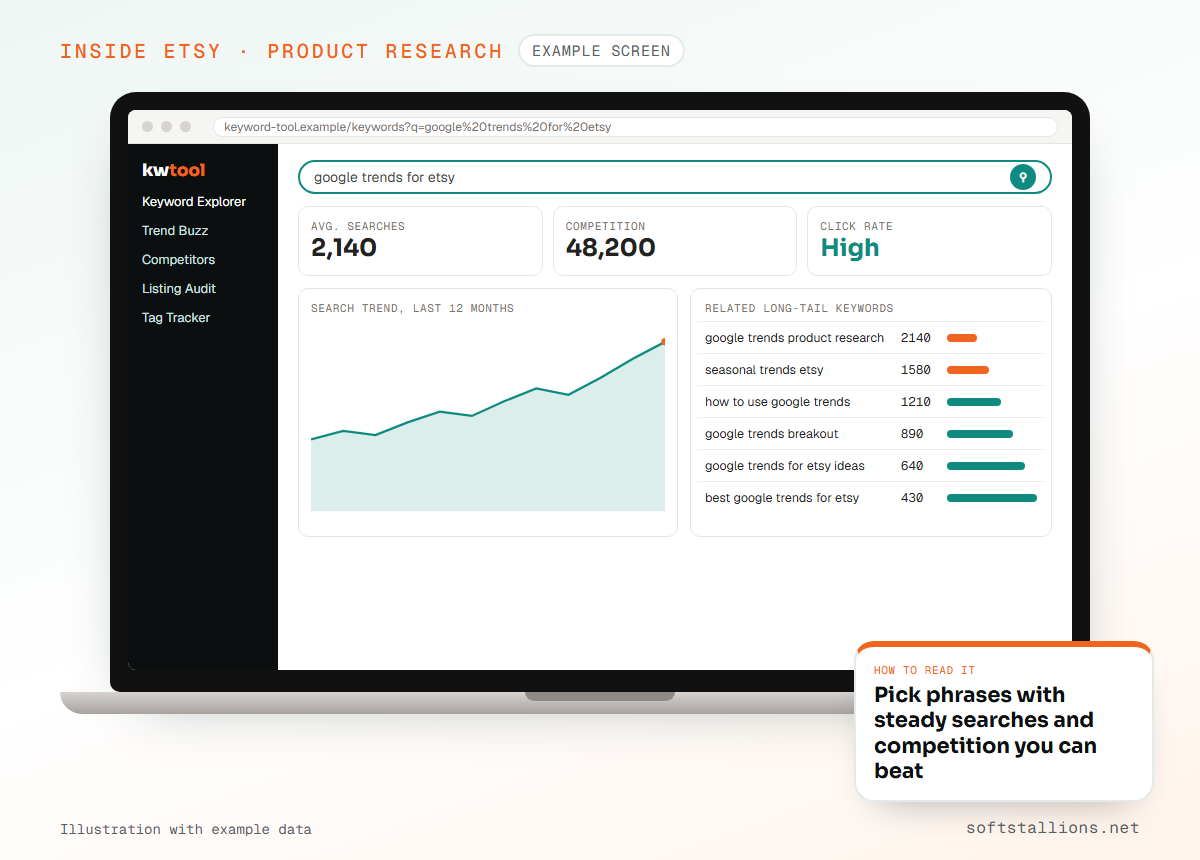
Google Trends shows relative search interest. Google takes a sample of searches, divides each data point by the total searches in that place and time range, and scales the result from 0 to 100. A score of 100 is the peak of interest within the chart you're looking at. A score of 50 means half that level.
Three points from Google's own documentation matter for sellers:
Google also notes that a spike doesn't mean a topic is "winning". Treat Trends as one signal among several.
Yes, for the right questions. Google Trends reflects searches on Google, not on Etsy, and it says nothing about what people buy. It's strong at three jobs:
It's weak at telling you whether a product will sell, what price buyers accept or how much competition you face on Etsy. For those, you need Etsy's own search results and tools, which we cover in our guide to Etsy product research.

Go to trends.google.com and work through these settings each time. Small changes in setup produce very different charts.
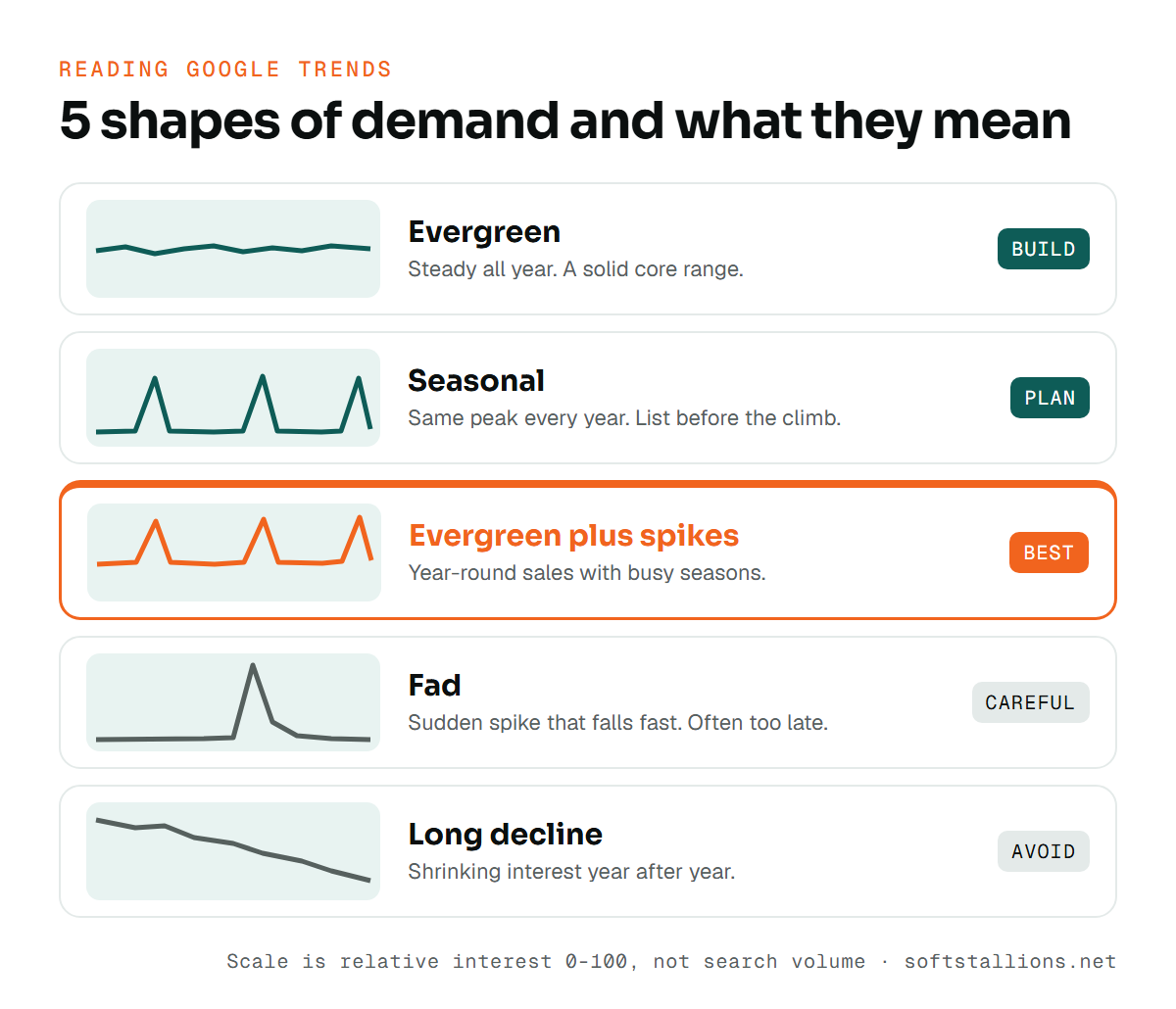
The line's shape matters more than its height. Most product searches follow one of five patterns:
| Pattern | What it looks like | What it means for Etsy |
|---|---|---|
| Evergreen | Fairly flat line with small bumps | Steady demand all year. Good for a core range. |
| Seasonal | The same peak in the same weeks every year | Predictable. List well before the climb starts. |
| Evergreen plus spikes | A steady base with sharp yearly peaks | The best of both: year-round sales with busy seasons. |
| Fad | A sudden spike that falls back quickly | Risky. Often over before your listings get found. |
| Long decline | A line that slopes down year after year | Shrinking interest. Avoid building a shop on it. |
A rising five-year line is encouraging, but check that it's still rising in the most recent year. Many topics climbed fast, flattened, and are now slowly falling.
Below the chart, Google Trends lists related searches and topics. There are two views:
Rising queries are where new angles come from. If "teacher gift" shows a rising query for a specific grade or a specific occasion, that may be a listing angle few shops cover yet. Apply one filter before you act: if a rising phrase can't become a clear product title for a clear buyer, ignore it. News stories, memes and celebrity names often break out with no buying intent, and many involve names or phrases you have no right to use.
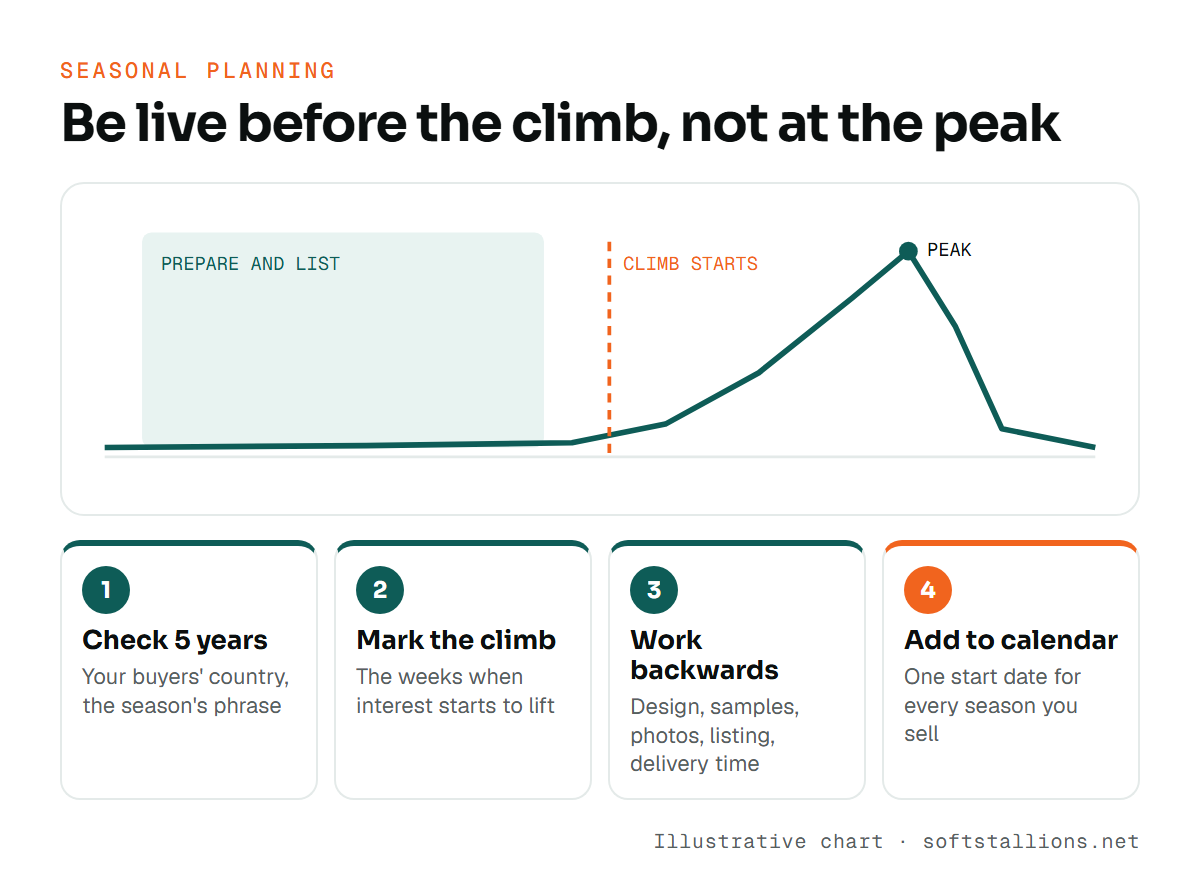
Seasonal planning is where Google Trends is most useful for Etsy shops. Etsy search needs time to show and test new listings, and buyers of personalized or made-to-order items shop early. The method:
Search a phrase such as "christmas ornament personalized" or "teacher appreciation gift" for your buyers' country over five years. Hover over the line to see the weeks when interest starts to lift, when it peaks and when it drops.
The peak is when most people search. The start of the climb is when early buyers begin. Your listings should already be live and polished by then.
Subtract the time you need to design, order samples, photograph and list. For print on demand, add production and shipping time so orders arrive before the date. That gives you your start date.
Repeat for every season you sell into and keep the dates in one calendar. Our seasonal print on demand calendar builds on this, season by season.
Comparison works best between closely related phrases that a buyer might choose between. For example, compare "bridesmaid proposal box", "bridesmaid tote bag" and "bridesmaid robe" rather than "bridesmaid" and "dog". Look for:
Use comparison to decide which product to make first, not whether to make it at all. A lower line can still be the better Etsy opportunity if fewer shops serve it well.
Every promising chart needs a second check inside Etsy before you spend time on designs:
If the idea passes, test a small batch of listings and let your Etsy Stats tell you the rest.
Partly. Google Trends helps you understand the words people use for a theme and how those words change. If two phrases mean the same thing, Trends shows which one is more common in your buyers' country. Rising queries can suggest a new tag or a new listing angle.
Don't paste every related query into your titles. Etsy titles work best when they describe the item clearly in the words buyers type on Etsy, and those words come from Etsy search suggestions and your own Stats. Use Trends to choose the direction, then confirm the exact phrases with Etsy keyword research. If you'd rather hand this off, our Etsy keyword research service combines both sources.
Used with Etsy's own data, Google Trends removes a lot of guesswork about timing. For a full validation of your ideas, our Etsy product research service pairs trend timing with Etsy demand and competition checks.
No. Google Trends is based on Google searches. For Etsy search data, use Etsy's search suggestions, Marketplace Insights and the search terms in your shop's Stats.
Use the past five years to see seasonality and long-term direction, and the past 90 days or 12 months to see current momentum. Look at both before you decide.
Breakout means a related search grew by more than 5,000% compared with the previous period. It signals fast growth, not large volume.
Google Trends shows very low-volume searches as 0. Try a broader phrase or a topic, and check the specific phrase in Etsy search instead.
Have them live before interest starts to rise in Google Trends, and add your design and production time on top. For made-to-order and print on demand items, also allow for delivery time.
Free consultation · USA & worldwide
We combine Google Trends timing with Etsy search and competition data to tell you what to list and when. You get a clear plan instead of reacting after the peak.
Or see: Etsy product research · Etsy keyword research · Etsy SEO services
What to sell on Etsy in 2026: product ideas that suit Etsy buyers, what the Creativity Standards allow, what to avoid and how to test an idea first.
Etsy competitor analysis step by step: find shops that rank for your keywords, break down their listings and reviews, track gaps and improve without copying.
Etsy product research in 9 steps: collect real search phrases, read page one, check the rules, work out profit after fees, then test a small batch.